

- Microsoft is improving Windows 11 search in several ways
- That includes a quieter search panel, the ability to disable web results, a better way to prioritize returned results, and more stable search overall.
- This is in testing for now, and the main concern is how long it will take Microsoft to get all of this released.
If you’re fed up with the way Windows 11’s search function works, and you wouldn’t be alone, some incoming changes will greatly improve this experience.
Microsoft revealed the search box adjustments in a blog post, explaining that they will be delivered in a phased rollout to testers in the Experimental channel for Windows 11 preview builds.
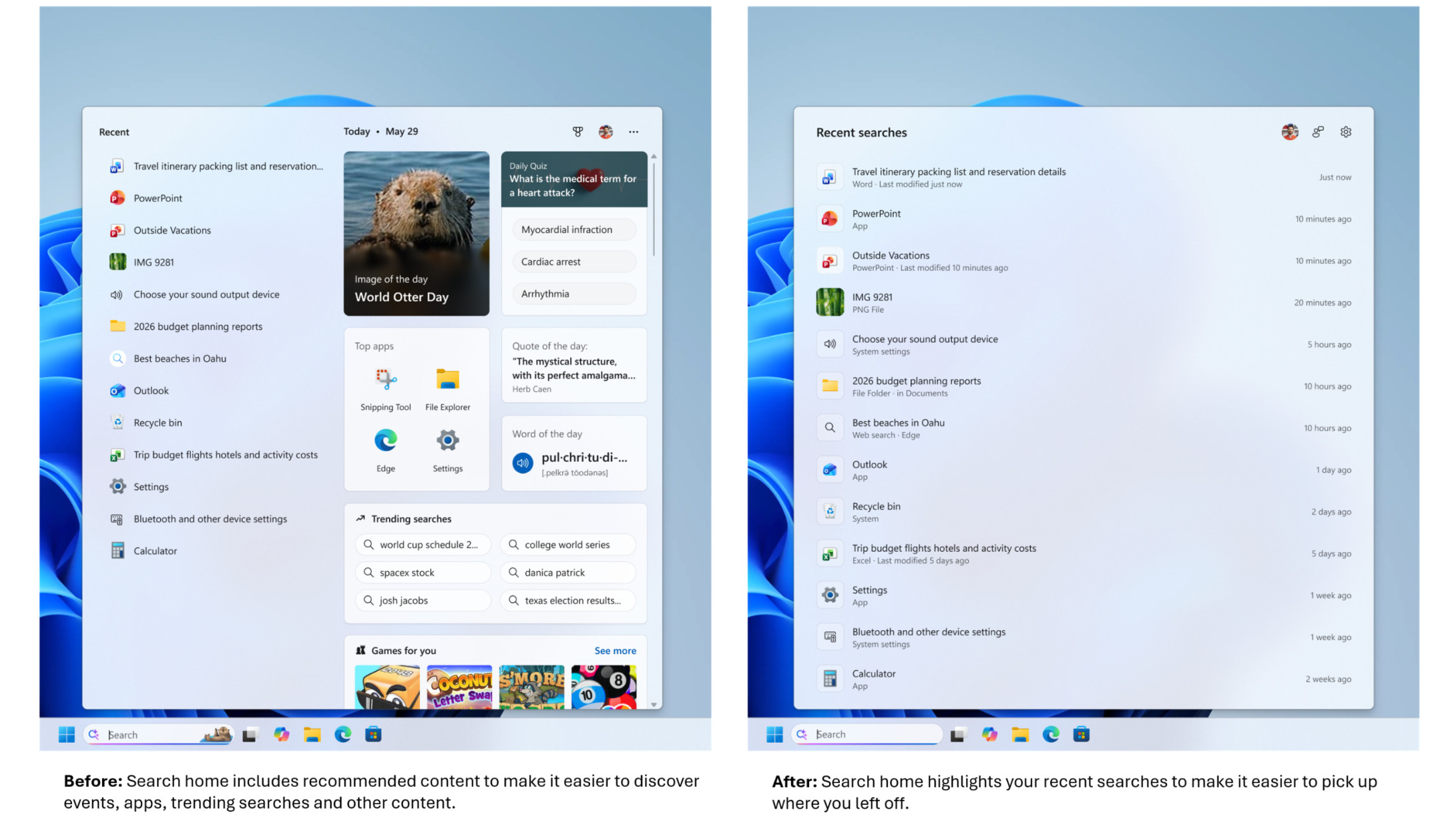
The first major change is simply to make searching a quieter place, so that when the dashboard appears, it only contains a list of your recent searches (allowing you to easily start one of them again if you want). The current clutter on the right of that list has been removed, including recommendations (some of which are direct ads) along with trending searches.

And the second major job here is that Microsoft is finally giving Windows 11 users the ability to get rid of web results in search. Currently, when you search for a file in the operating system, you not only get local results (for files on your drives), but also some web results that can get in the way.
In this new scheme of things, you will be able to disable all web results in Settings and also get rid of Microsoft Store suggestions.
If you keep these results, Microsoft notes that they will not be prioritized, although this is something the company had already started to address (it used to be the case that web content could appear at the top of the returned results in a truly disconcerting way). The web results have also been stripped of any “promotional content”, so you’ll only get the most relevant answers if these results are enabled.
Microsoft has also tightened the handling of results for Windows 11 settings so that the most relevant options appear higher in the hierarchical order, and Microsoft says more adjustments are planned on this front.
The search box will also be able to handle typos, with an improved ability to guess what you really meant (‘Chrome’ instead of ‘Chome’, for example), and will start showing possible results after typing just two characters (another improvement we’ve already heard about).
While this is mostly about simplification, Microsoft goes the other way in one notable aspect: adding a little more detail to the files returned in the results. Search will now provide more information about files (such as when they were last opened) and a more detailed preview in the right pane, so you can more easily know what will open if you click on that result.
Finally, Microsoft is making search more reliable, which means “reducing [the] probability of failures and charging problems”, which is obviously a welcome measure.
Analysis: Throwing Fly in the Soothing Search Ointment
Searching for Windows 11 has always been a somewhat painful affair for me, thanks mainly to the clutter of thinly veiled (or not even veiled) ads and irrelevant results that appeared with a disconcerting level of priority, as noted. Frankly, Windows 10 isn’t much better, but in any case, I’m very happy to see the new direction Microsoft has taken here.
The calmer search results are a big help, and Microsoft is following along with the optimization it recently announced for the widget panel, which became a calmer place. (This all follows a broader initial promise to curb upsells with Windows 11 and generally make the interface a calmer place.)
I was hoping for the option to disable web results to appear, and this is the most important addition for me personally. I’m not alone, and the reaction to these various changes has been very positive, with the only real sticking point being impatience over when these new features will be implemented. This applies to both testers who want to try out the revamped search box now and the general computing public wondering when they’ll finally get their hands on all of this.
As this tester posts on Reddit: “We love this… except for gradual rollouts. We don’t like it when things are inconsistent from PC to PC despite running identically.” [test] build [of Windows 11]. It’s really unpleasant and breaks muscle memory. But the changes look great and I look forward to trying them out.”
As Microsoft points out in its blog post, it’s worth remembering that there are now feature flags that can be enabled if you really want to try something in a preview build and it’s not on your PC yet.
However, as for those asking: ‘For those of us who are free, when might this come?’
Well, that’s a very different matter, as this work could take quite some time to progress through testing. Mainly because there are a lot of changes involved, and it’s not something Microsoft wants to rush (especially given the push to make search more reliable and stable).
And when these search improvements are finally released outside of testing, it will be in a controlled rollout that won’t jump the queue. There’s a reason for this, though: Microsoft will need to watch the changes roll out gradually to make sure there aren’t any unexpected gremlins in the works.
So you’ll have to be patient, and there’s some frustration about how long controlled rollouts can take these days (last year’s Start menu overhaul is a key example here; some people still don’t have it). But the good news is that these changes are coming, and they promise to significantly revamp search in Windows 11. I can’t wait (but I’ll have to).

Follow TechRadar on Google News and add us as a preferred source to receive news, reviews and opinions from our experts in your feeds.

The best laptops for all budgets