
- Latest Google Chrome US update adds new side panel that opens when you click the Gemini button
- Nano Banana can now edit images directly within Chrome browser tabs
- A new agent auto-scan feature can handle multi-step web tasks in the background.
Google is transforming Chrome into an artificial intelligence-based browser for American users. With a new Gemini side panel, built-in AI agents, and Nano Banana image editing, the latest update lets Chrome understand what you’re doing across multiple tabs and even complete tasks in the background, marking the biggest change in how the browser works in years.
Thanks to the recently announced Personal Intelligence feature, Gemini knows more about you than ever, allowing it to be more helpful and context-aware within Chrome too.
On top of this, a new auto-browse feature can take care of multi-step tasks like booking tickets or planning a vacation in the background while you continue browsing.
Here’s a closer look at the new features.
Gemini Side Panel
The most notable change in the new Chrome is the Gemini side panel, which can always be accessed no matter which tab you are on. However, it is not mandatory, you still have to activate it. To do that, simply click on the Gemini icon in the top right corner of Chrome and the side panel will appear, like this:
Multitasking using the side panel works by keeping your main work open in the main tab while handling a separate task in the side panel. This is ideal for comparing options across different tabs, summarizing product reviews from multiple sites, or finding time for events on chaotic calendars, all using natural language prompts in Gemini.
Nano Banana Image Editing
The updated Chrome also lets you use Google’s Nano Banana image generator without having to go anywhere else. That means there is no longer a need to download images from web pages and then upload them to Gemini separately.
If an image is open in a browser tab, you can now type a message in the side panel to modify it using Nano Banana. For example, if you find a living room layout you like, you can ask Gemini to change the couch or chairs, even referencing open items in another tab. Everything happens within the side panel and is then available for download.
Here is an example:
Automatic navigation
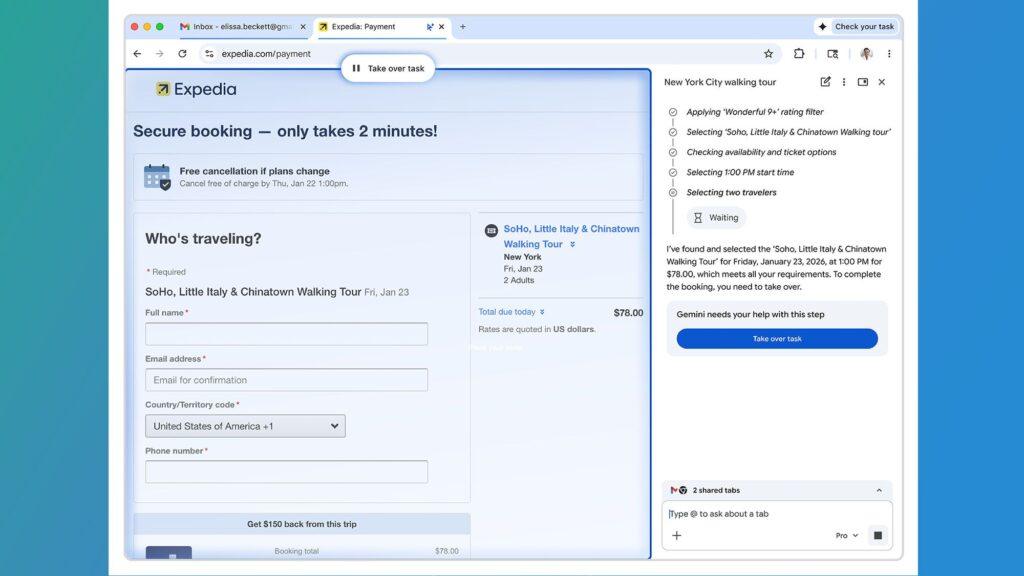
Perhaps the most impressive new AI feature in Chrome is automatic navigation. It’s essentially an AI agent that you can send to complete multi-step web-based tasks, like booking concert tickets or creating travel itineraries, while you get on with something else.
Automated navigation is designed to silently take care of online management. Instead of jumping between tabs, you can ask it to book appointments, collect tax documents, check if invoices have been paid, or manage subscriptions on your behalf. It can also handle more time-consuming tasks, such as collecting quotes from plumbers or electricians, filing expense reports, and expediting tasks like renewing your driver’s license.
AI agents in browsers aren’t new – Perplexity’s Comet browser is a good example – but they fundamentally change the way we use the web by saving time. A common obstacle is that many booking sites require logins. Chrome addresses this by using the Chrome Password Manager to automatically log you in.
Autobrowse is designed to pause and explicitly ask for your confirmation or ask you to complete some tasks, such as making a purchase or posting on social media. Automated navigation is currently rolling out in preview in the US for Google AI Pro and Google AI Ultra subscribers.
Below is an example of automatic scanning in action:
Personal intelligence and connected applications
The new Chrome uses Google’s recently announced Personal Intelligence feature, along with Connected Apps. This brings together information from across the Google ecosystem to add context and insight to your requests.
For example, if Personal Intelligence finds the name of your child’s school in your Gmail, it can calculate semester dates, which is useful if you search for holidays in different tabs and ask, “Which of these coincide with my children’s spring break?”
Personal Intelligence also uses the context of past conversations to deliver more personalized responses over time. The new browser also features new defenses designed to protect you from the latest security threats.
When using connected apps, you can also ask Gemini to send an email using your Gmail. This is how it works:
Is this too much AI?
By putting AI at the center of web browsing, the new Chrome seems like a natural evolution of Google’s most popular browser. With Gemini’s popularity rising relative to ChatGPT following the release of Nano Banana and Gemini 3, integrating it directly into Chrome could give Google’s chatbot another boost and make users less likely to look elsewhere for AI tools.
It’s always going to be difficult to balance AI feeling like it’s crammed unnecessarily into products and actually being useful, but the fact that the new AI side panel only appears when you click the Gemini button in Chrome helps make it feel less intrusive.
Gemini in Chrome remains a US-only feature for now and the new features will roll out today.
Follow TechRadar on Google News and add us as a preferred source to receive news, reviews and opinions from our experts in your feeds. Be sure to click the Follow button!
And of course you can also follow TechRadar on TikTok for news, reviews, unboxings in video form and receive regular updates from us on WhatsApp also.
The best business laptops for every budget


