
- A French naval officer accidentally revealed the location of his warship
- This happened when he uploaded his fitness data to Strava.
- The fitness app has already compromised security in a similar way
You may not think your regular use of Strava is a security risk, but when both public activity logging and sensitive military data are involved, things can look very different. That’s exactly what a French naval officer discovered after his training revealed the location of a French aircraft carrier en route to the Middle East.
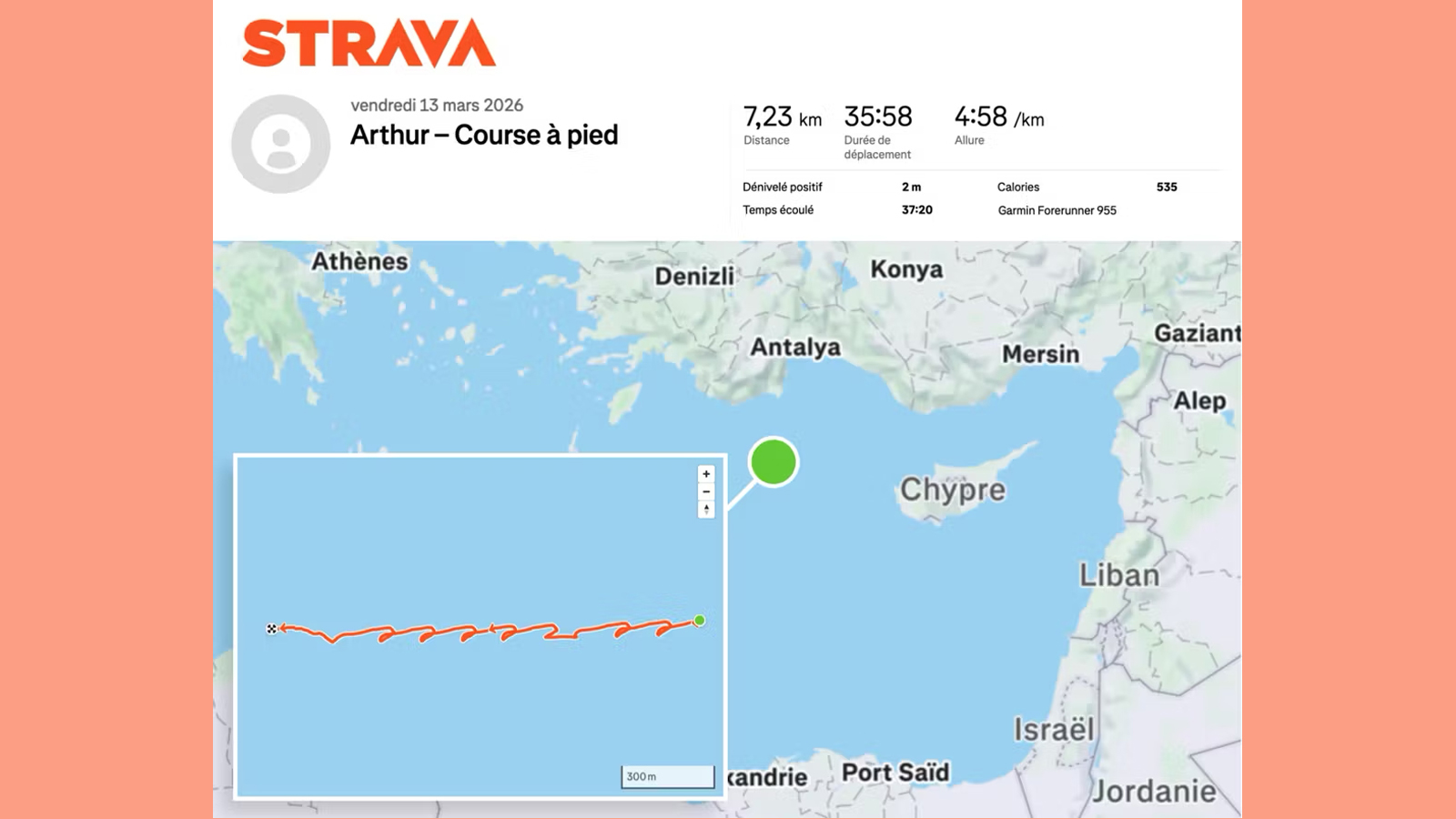
According to Le Monde (via BBC News), the officer, referred to only as Arthur, recorded a 35-minute run on March 13 (see image below). However, unlike most runners, his exercise took place on the upper deck of the aircraft carrier Charles de Gaulle, which was being deployed to the eastern Mediterranean in light of the US and Israel’s ongoing conflict with Iran.
By recording the activity and uploading it to the Strava app, Arthur apparently revealed his location and, by extension, that of the ship he was serving on. That posed a significant risk to the safety of the vessel, given that location data like this can be viewed publicly in the Strava app (scroll down to find out how to turn it off).
Article continues below.
According to Le Monde, the ship was northwest of Cyprus and about 100 kilometers (62 miles) from the Turkish coast at the time. In a statement to the AFP news agency, the French military said the officer’s actions “did not comply with current instructions” and that action would be taken if they were found to be true.
How to keep your Strava data private
Careless use of fitness and wellness apps has led to similar situations in the past.
As cited by BBC News, French President Emmanual Macron’s location was revealed on several occasions due to Strava runs accidentally shared by his bodyguards. Strava data has also allegedly compromised the whereabouts of both former US President Joe Biden and Russian President Vladimir Putin, while in 2018 the platform allegedly revealed the locations of US military bases.
This type of incident may not seem to be particularly relevant to you; After all, most people don’t exercise aboard warships or while protecting high-ranking politicians. But the privacy implications of this public activity log may affect your own confidentiality and security.
For example, stalkers could learn the whereabouts of a potential victim by tracking their frequent exercise spots. Meanwhile, burglars could determine when you’re out of the house running, giving them a good time to break into your home.
There are a few things you can do to protect your location data in the Strava app (on both iOS and Android). First of all, go to the “You” tab at the bottom right, then go to the Settings gear (top right) > Privacy controls > Activities. Here you can ensure that your activities are visible to “Only you”.
Within Privacy Controls, you can also go to Map visibility and choose ‘Completely hide your activity maps from others’, then toggle ‘Hide all maps’. This is where you can also find what were previously called ‘privacy zones’, in the ‘hide the start and end points of activities’ option. For more information about Strava’s privacy controls, go to its privacy center.
Follow TechRadar on Google News and add us as a preferred source to receive news, reviews and opinions from our experts in your feeds. Be sure to click the Follow button!
And of course you can also follow TechRadar on TikTok for news, reviews, unboxings in video form and receive regular updates from us on WhatsApp also.


